Many organisations know that Microsoft Project will change. Fewer realise how many products are affected at the same time, and what that means at portfolio level. By 2026, multiple Microsoft Project–related platforms reach a decisive point:
- Project Online will be shut down on September 30, 2026
- Project Server 2016 and 2019 move into security-updates-only and then out of support
- Several desktop and cloud variants reach lifecycle transitions within the same timeframe
Individually, these dates may seem to look manageable. Together, they form a compound risk that affects governance, security, cost predictability, and the way organisations run projects.
Lifecycle decisions are often assessed per product. A common argument is simply: “Project Server is still supported”. What this approach overlookos is the portfolio effect. When multiple platforms transition simultaneously, organisations face:
- Overlapping migration pressure
- Limited availability of specialist skills
- Rising operational and compliance risk
- Unplanned cost escalation
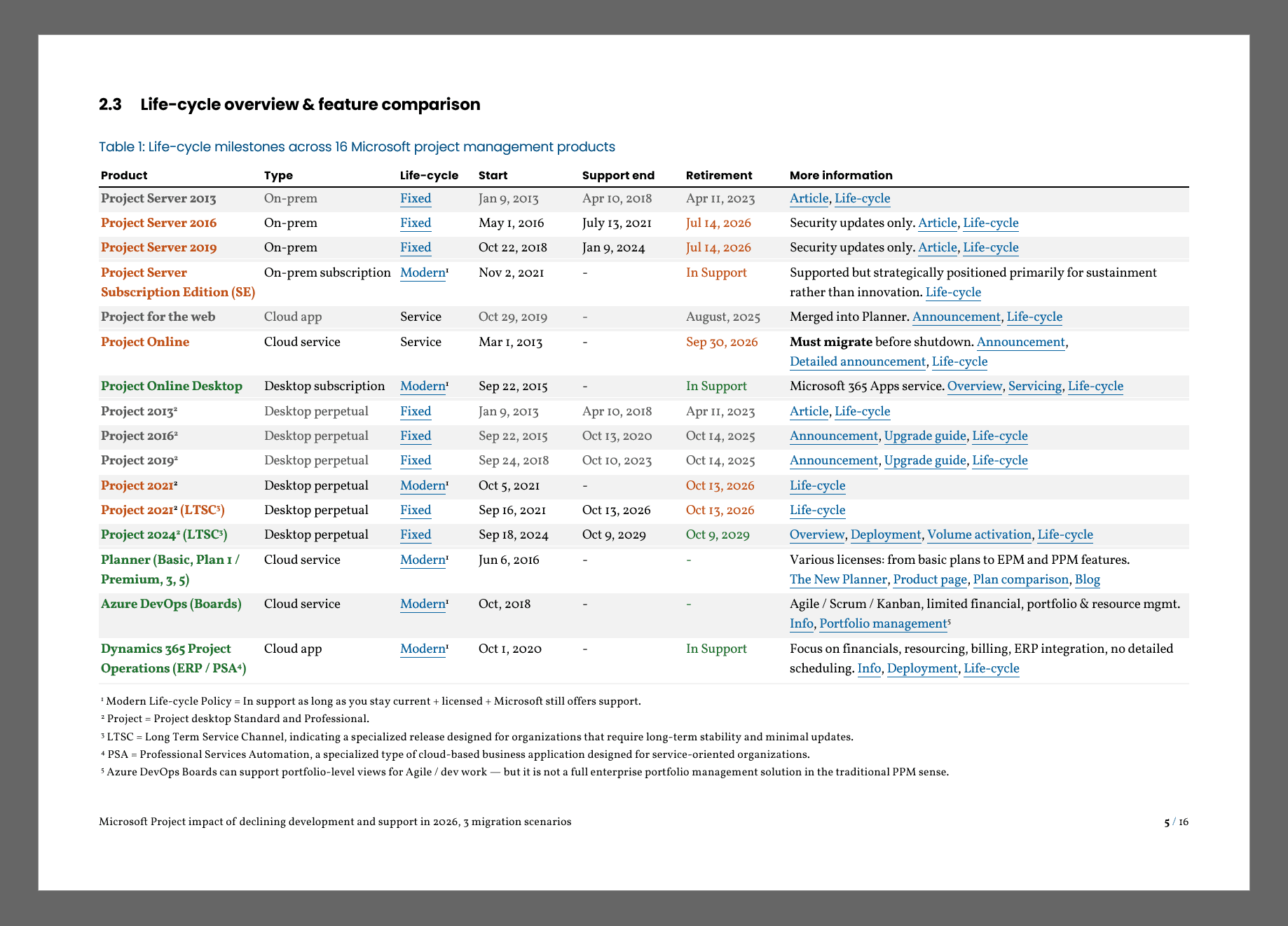
Table 1 – Life-cycle milestones across 16 Microsoft project management products
Organisations planning a Microsoft Project migration must now assess multiple lifecycle transitions simultaneously. This life-cycle table – which you also find in the free whitepaper (no registration) – makes it visible at a glance, showing 16 Microsoft project management products and their support timelines side by side. In the whitepaper, the page thereafter shows “Table 2 – Focus on decision-relevant capabilities of 8 active products, not an exhaustive list”.
This is where “waiting a bit longer” stops being a neutral option.
Impact SharePoint 2013 workflow retirement on Project Online
The retirement of SharePoint 2013 workflows on 2 April 2026 further compresses the migration timeline concerning Project Online.
Automations in Project Online that rely on SharePoint 2013 workflows – such as approvals, change control or onboarding – will stop functioning when the service is retired. This creates a material risk of disrupted portfolio governance and stalled project approvals up to six months before the Project Online service itself is discontinued.
You can resolve this temporarily by replacing these workflows with Power Automate ones. Then you have bought some time before migrating from Project Online to another solution.
Using Power Automate for Project Lifecycle Workflows in Project Online – Part 1
Supported does not mean future-proof
A key insight from the whitepaper is the distinction between:
- Technical support status, and
- Strategic sustainability
Some platforms remain supported but are positioned for sustainment rather than innovation. Microsoft’s strategic investment has shifted toward a role-based project ecosystem, deliberately separating:
- Execution (Planner)
- Planning and control (Project desktop / Project Plans)
- Governance and insight (Power BI, Power Platform)
There is no single successor to Project Server or Project Online. Migration is therefore not a lift-and-shift, but a redesign of how project work is organised and governed.
Lifecycle transitions require operating model decisions
Lifecycle transitions are therefore not only technical migration events. They also force organisations to reconsider how project work is organised and governed. In the Microsoft ecosystem, planning, execution, collaboration and reporting are now distributed across multiple services. This means migration decisions inevitably affect the project operating model: how portfolios are governed, how teams collaborate, and how information flows between planning, delivery and reporting.
Organisations that treat migration purely as a tooling replacement risk recreating the same structural limitations in a new platform landscape. Those that treat it as an operating model decision can use the transition to improve portfolio governance, transparency and decision-making.
Why 2026 matters
The decisions organisations defer today will still need to be made – but under less favourable conditions:
- Higher risk
- Higher cost
- Less freedom of choice
Lifecycle milestones do not force a specific solution, but they do force a decision.
What the whitepaper helps you decide
- Complete lifecycle overview across relevant Microsoft’s project management and portfolio management products
- Feature comparison table for Project, Planner, Azure DevOps (Boards) and Dynamics 365 Project Operations
- Three migration scenarios, tailored to small, mid-sized, and large organisations
- Financial impact and cost ranges per scenario
- Guidance on treating migration as a modernisation of the project operating model, not a tooling upgrade
This enables management teams to move from reactive lifecycle management to explicit, time-bound decision-making. For a deeper analysis, download the whitepaper here. No registration needed: